

Want to play Fall Guys with friends who own a different console or gaming device? The good news is that Fall Guys cross platform support lets players connect across supported platforms instead of requiring everyone to use the same system. You can compete together, create a party, and enjoy the game’s colorful obstacle courses from different devices.
This guide explains which platforms support crossplay, how to invite friends, how cross-progression works, and what to do if your party cannot connect.
Is Fall Guys Cross Platform
Yes, Fall Guys supports cross-platform play, commonly called crossplay. According to the official Fall Guys website, players can enjoy crossplay, cross-platform parties, and cross-progression through an Epic Games account.
This means you do not all need a PlayStation, Xbox, Nintendo Switch, or PC to play together. Instead, supported platforms connect through the game’s online services, allowing friends to join the same party and participate in compatible game modes.
However, crossplay and cross-progression are different features. Crossplay lets you play with someone on another platform, while cross-progression helps carry supported game progress between linked platforms. Understanding this difference makes it easier to set up your account correctly.
Which Platforms Support Fall Guys Crossplay?
Fall Guys is available on several gaming platforms, including PlayStation, Xbox, Nintendo Switch, and PC. Its official website confirms cross-platform support, while Epic Games also identifies Fall Guys as a crossplay title.
The exact setup depends on where you play. PC players can access the game through supported PC storefronts, while console players can launch it on their respective systems. Mobile versions are also available in supported regions, with platform availability varying by operating system and location.
The table below summarizes the main platform options and how crossplay helps players connect.
| Platform | Availability | Crossplay |
|---|---|---|
| PlayStation 4 and 5 | Console | Supported |
| Xbox consoles | Console | Supported |
| Nintendo Switch | Handheld and TV | Supported |
| PC | Supported PC storefronts | Supported |
| Android | Supported regions | Supported |
| iOS | European Union availability | Supported |
Platform availability and regional restrictions can change. Check the official store for your device before downloading, particularly if you plan to play on mobile.
How to Play Fall Guys Cross Platform With Friends
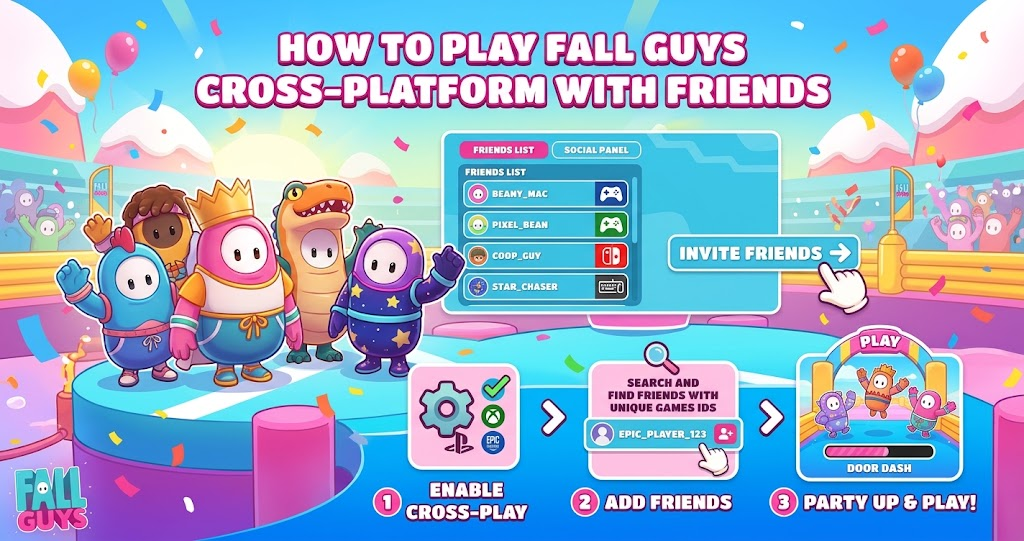
Setting up a cross-platform party is straightforward once everyone has access to the game and an Epic Games account. You do not need to own the same console as your friends, but you do need to connect through the game’s friend system.
Add Friends Through Epic Games
First, launch Fall Guys and sign in using your Epic Games account. If you have not connected an account before, follow the in-game prompts to complete the setup.
Next, open the party interface and search for your friend’s Epic Games Display Name. Send a friend request if the person does not already appear in your friends list. Once they accept, you should be able to invite them to your party.
Epic Games confirms that players can add friends using their Epic Games Display Name and play together across supported platforms.
Invite Friends and Start a Match
After adding your friends, open your party and send them invitations. Once everyone has joined, choose an available show and start matchmaking.
You can team up with up to three friends, creating a party of four players. This is useful for Squads and other compatible activities, although individual qualification rules depend on the game mode.
For the smoothest experience, make sure everyone has installed the current game version and can access online services. If an invitation fails, check your account connection and friend list before repeatedly sending new invites.
Fall Guys Cross Platform vs. Cross-Progression
These two features solve different problems, so it helps to understand what each one does before switching devices.
Crossplay connects players who use different platforms. Cross-progression, meanwhile, allows eligible progress and content to follow a linked Epic Games account between supported platforms.
Does Your Progress Carry Over?
Fall Guys supports cross-progression through an Epic Games account. However, linking accounts does not necessarily merge every item or reward from every existing profile.
Epic Games explains that the platform profile linked first becomes the primary profile for progression. Certain progress and currencies transfer from that primary profile, while balances from other profiles may not combine automatically.
Therefore, think carefully before linking accounts if you already have costumes, rewards, or progress on multiple platforms. If you accidentally select the wrong primary profile, consult official support before making further changes.
How to Fix Fall Guys Crossplay Problems
Crossplay usually works through the game’s online systems, but connection issues can occasionally prevent friends from joining the same match. Fortunately, a few checks can help you identify the problem without changing unnecessary settings.
Check Cross-Platform Matchmaking
If you can enter the game but struggle to find opponents, open Settings and select Options. Under Gameplay, locate Cross-Platform Matchmaking and make sure it is enabled.
Epic Games recommends keeping this setting on because it allows matchmaking with players on other platforms and can help matches start more quickly.
Check Your Server Region
Sometimes, matchmaking problems relate to the selected server region rather than crossplay itself. Open the game’s options and check the Server Region setting.
Automatic is a sensible starting point because it selects a suitable region. However, if queues remain unusually long, testing another nearby region may help. Choosing a distant server can increase latency, so prioritize a stable connection over a faster queue.
Verify Your Account and Game Version
If a friend cannot join your party, confirm that both players are signed into the correct Epic Games accounts. Also, check that the friend request was accepted and that neither player is experiencing a network or service outage.
Restarting the game can refresh the connection, while checking official announcements can help you identify known service issues. Avoid unlinking accounts as a first troubleshooting step because account changes may affect your progression setup.
Is Fall Guys Cross Platform Worth Using?
Crossplay makes Fall Guys easier to enjoy with friends who own different gaming systems. You can organize a party without asking everyone to buy the same console, which is particularly useful for groups spread across PC and console gaming.
The feature also gives you more flexibility when choosing where to play. Someone might prefer a console in the living room, while another friend uses a PC at a desk. Cross-platform parties help both players join the same fun, chaotic obstacle-course experience.
However, a successful party still depends on compatible access, a working online connection, and the correct account setup. Once these details are sorted, crossplay removes much of the hassle associated with multiplayer gaming across devices.
If you enjoy party games, you may also like [best multiplayer games to play with friends] and [free cross-platform games]. For more Fall Guys help, consider reading [how to fix Fall Guys matchmaking problems].
Conclusion
Fall Guys cross platform support lets you play with friends across supported platforms, including PlayStation, Xbox, Nintendo Switch, and PC. With an Epic Games account, you can add friends, create a party, and join compatible matches without everyone using the same device.
Cross-progression also helps you access supported progress across linked platforms, although existing profiles and rewards may have limitations. If you encounter connection problems, check matchmaking settings, your server region, and your account details first.
FAQs
Is Fall Guys cross platform between PC and PS5?
Yes, Fall Guys supports crossplay between PC and PlayStation 5. Players can add one another through their Epic Games accounts, create a party, and join compatible matches. Make sure both players can access online services and have completed the account setup before sending an invitation.
Can Xbox and PlayStation players play Fall Guys together?
Yes, Xbox and PlayStation players can play Fall Guys together through cross-platform support. You do not need matching consoles to join a party. Add your friend using their Epic Games Display Name, send an invitation, and select an available game mode once everyone joins.
Is Fall Guys cross platform between Nintendo Switch and PC?
Yes, Nintendo Switch and PC players can use Fall Guys crossplay to play together. Both players should sign in correctly, add each other through Epic Games, and join the same party. If matchmaking fails, check the cross-platform matchmaking setting and confirm that your connection is working.
Does Fall Guys have cross-progression?
Yes, Fall Guys supports cross-progression through linked Epic Games accounts. Eligible progress and items can carry across supported platforms, but different profiles do not automatically merge every reward or currency. Check which platform profile is primary before linking accounts if you already have progress on multiple devices.
Is Fall Guys free to play on different platforms?
Fall Guys is free to play on its supported platforms, although availability and download methods depend on the device and region. You can check the official game website or your platform’s digital store for current availability. Optional in-game purchases may still be offered, so free access does not mean every item is free.
For more updates visit: PUBLIC TALK


