Getting lost in a massive fantasy world can be exciting until you spend hours searching for one missing treasure or mysterious location. The Crimson Desert interactive map makes exploration easier by helping players identify important places, track discoveries, and plan their next adventure. Whether you are hunting collectibles or searching for useful resources, this guide explains how to use map filters and navigate Pywel more efficiently.
What Is the Crimson Desert Interactive Map
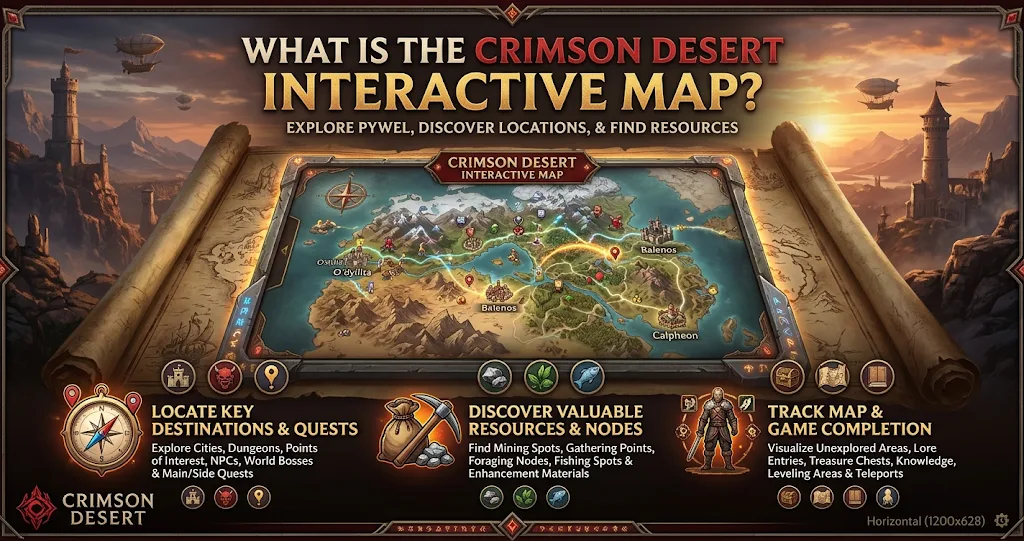
The Crimson Desert interactive map is a browser-based exploration tool that displays important locations across Pywel, the game’s enormous fantasy continent. Instead of searching randomly, players can use map markers to locate specific discoveries and points of interest.
These tools are particularly useful when exploring unfamiliar territories. You can search for treasure chests, caves, settlements, shops, crafting stations, and other important destinations.
Several independent fan-made maps are available online. They provide different marker collections, filtering options, and progress-tracking features. However, these resources are not official Pearl Abyss products.
One useful option is the Crimson Desert map available through crimsondesertinteractivemap.com. It provides searchable markers and separate categories for locations, resources, services, quests, and collectibles.
How to Use the Crimson Desert Interactive Map
Using an interactive map is straightforward, even if you are new to external gaming guides. Open your preferred map website and explore its available regions and marker categories.
The map usually displays different icons for individual discoveries. Selecting a marker reveals additional information, which can help you understand what you need to find and where to travel.
Search for Specific Locations
The search function is one of the most useful features. Instead of examining the entire continent, enter the name of a location or collectible to find its corresponding marker.
For example, players searching for a cave can filter cave locations rather than viewing every available point. Similarly, searching for a treasure chest makes it easier to identify potential rewards during exploration.
This approach saves time, particularly when completing unfinished quests or revisiting previously explored areas.
Use Filters to Reduce Map Clutter
Large maps can become difficult to read when hundreds of icons appear simultaneously. Therefore, category filters help display only the information relevant to your current objective.
You can focus on collectibles, crafting stations, shops, enemies, or exploration locations. Moreover, hiding unnecessary markers makes it easier to identify nearby discoveries.
For instance, players collecting resources can hide quest markers and concentrate on mineral deposits or plants. This creates a cleaner map and makes resource gathering more convenient.
Important Locations on the Pywel Map
Pywel contains several distinctive regions, each offering different environments and exploration opportunities. Understanding their general characteristics can help you plan longer journeys.
Hernand introduces players to settlements, surrounding wilderness, and various exploration opportunities. Pailune offers colder landscapes and mountainous environments, while Demeniss features important settlements and commercial locations.
Delesyia provides coastal scenery and trading-related destinations. Meanwhile, the Crimson Desert region introduces harsh desert environments that create different exploration challenges.
The following table explains the main categories worth tracking while exploring.
| Map Category | What You Can Find | Why It Matters |
|---|---|---|
| Settlements | Towns and villages | Discover services |
| Collectibles | Chests and memory fragments | Complete discoveries |
| Resources | Minerals and plants | Gather materials |
| Locations | Caves, ruins, and forts | Explore new areas |
| Services | Shops and crafting stations | Support progression |
| Abyss Locations | Nexuses and gates | Navigate special areas |
These categories serve different purposes. For example, settlements help players access useful services, while resource markers support crafting and equipment preparation. Consequently, choosing the right filters can make every journey more productive.
Finding Treasure Chests and Collectibles
Treasure hunting is an important reason to use an interactive map. Hidden rewards can encourage players to investigate locations they might otherwise overlook.
Treasure chest markers help identify possible reward locations. Meanwhile, memory fragments and other collectibles provide additional exploration goals.
However, finding a marker does not always mean reaching the reward will be easy. Some discoveries may require solving environmental puzzles, accessing unusual terrain, or completing specific objectives.
Therefore, examine the surrounding area before traveling directly toward a marker. A location might sit inside a cave, behind a structure, or somewhere above the visible ground level.
Progress tracking can also help prevent unnecessary revisits. Some independent map tools let players mark discovered locations as completed, making longer collection sessions easier to manage.
Resources Shops and Crafting Locations
The map is useful beyond treasure hunting. Resource markers can help players identify gathering opportunities without repeatedly searching the same areas.
Mineral deposits, plants, and other materials can support different crafting and preparation activities. As a result, resource filters become especially helpful when you need specific materials.
Shops and service locations also deserve attention. Blacksmiths, general stores, fishing shops, and other vendors can help players manage equipment and supplies.
Crafting stations provide another reason to check nearby markers. Finding an appropriate workstation can save travel time when preparing equipment or using gathered materials.
Exploring the Abyss With Interactive Map Filters
The Abyss introduces another layer of exploration in Crimson Desert. Its locations and navigation points can make ordinary world exploration feel more complicated.
An interactive map with a separate Abyss category helps players distinguish these discoveries from locations in the main world.
Abyss Nexuses and Abyss Gates are particularly useful markers to understand. They identify important points associated with navigating the Abyss and planning movement through its connected areas.
Players can also look for Abyss-related collectibles and artifacts. These discoveries provide additional objectives for anyone interested in completing more of the game’s available content.
However, always check which map layer you are viewing. A marker from the Abyss may not correspond to a location in the ordinary Pywel world.
Best Tips for Getting More From the Map
A little preparation can make interactive maps considerably more useful. Start by selecting one objective instead of displaying every available category.
For example, concentrate on nearby collectibles before switching to resource gathering. This prevents unnecessary travel and makes exploration feel more organized.
You should also compare map markers with your in-game surroundings. External maps provide helpful references, but they cannot replace understanding the actual terrain, obstacles, and quest requirements.
Progress tracking deserves attention as well. If your chosen map supports found-marker controls, use them regularly to avoid repeating completed discoveries.
Finally, remember that independent maps can receive updates. Marker information, categories, and locations may change as contributors improve their databases. Check the latest version when an important discovery appears to be missing.
Is the Crimson Desert Interactive Map Worth Using
Yes, an interactive map is a valuable companion for players who enjoy completing exploration objectives. It reduces unnecessary searching and makes it easier to identify locations that might otherwise remain undiscovered.
The biggest advantage is flexibility. You can concentrate on collectibles, resources, services, or special locations depending on your current goals.
Nevertheless, relying on markers for every discovery can reduce the excitement of exploring independently. Some players may prefer finding caves, treasures, and unusual locations without outside assistance.
A balanced approach works best. Use the map when you need specific information, but leave room for natural exploration and unexpected discoveries.
Consluion
The Crimson Desert interactive map provides a practical way to explore Pywel without wasting time searching for every location manually. Its search tools, category filters, and discovery markers make treasure hunting, resource gathering, and regional exploration easier to organize.
Whether you are looking for hidden collectibles, useful shops, crafting stations, or Abyss locations, an interactive map can make your adventure more efficient. However, remember that third-party maps are community resources rather than official game features.
FAQs
Is there an interactive map for Crimson Desert?
Yes. Several independent websites provide interactive Crimson Desert maps. These tools display locations, collectibles, resources, shops, quests, and other discoveries. Players can use search functions and category filters to find specific markers across Pywel.
What can I find on the Crimson Desert map?
You can find information about treasure chests, caves, settlements, ruins, shops, crafting stations, resources, quests, and Abyss locations. Available categories depend on the map website, and different projects may include different numbers of markers.
Does Crimson Desert have an official interactive map?
Pearl Abyss has not established the third-party interactive maps discussed in this guide as official game resources. They are independent community projects designed to help players navigate Pywel and locate important discoveries.
Can I track collectibles using an interactive map?
Yes. Some interactive map websites offer progress-tracking features that allow players to mark discovered locations. This makes it easier to monitor collection progress and avoid revisiting places unnecessarily. Available tracking options vary between websites.
Does the Crimson Desert interactive map include the Abyss?
Yes. Several map projects provide a separate Abyss layer with markers for locations such as Abyss Nexuses, Abyss Gates, and related discoveries. Make sure you select the correct map layer before searching for a specific location.
For more updates visit: PUBLIC TALK