Waiting for Fortnite to load can be frustrating, especially when you cannot tell whether the problem affects everyone or just your connection. Checking the Fortnite server status is only the first step. Understanding what each service indicator means can help you avoid unnecessary troubleshooting and know when it is worth trying again.
Epic Games provides a public status dashboard that tracks individual services rather than displaying only one general online or offline message. This guide explains how to read those indicators, follow incident updates, understand maintenance announcements, and recognize when a service problem might affect your next match.
Where to Check Fortnite Server Status
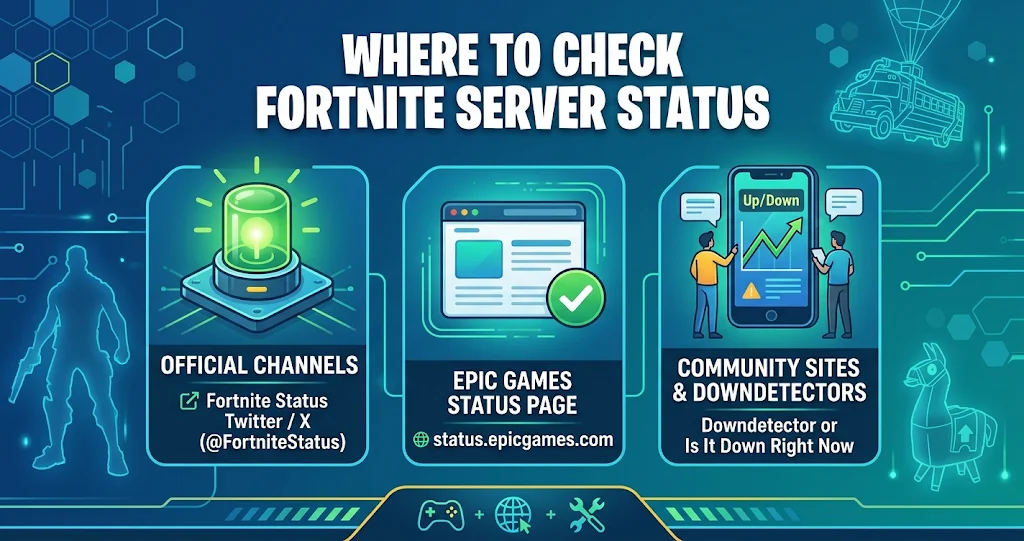
The most reliable place to check Fortnite’s service availability is the official Epic Games Public Status page. It displays the current condition of Fortnite services and provides information about reported incidents and scheduled maintenance.
You can visit the Epic Games Public Status page directly. The dashboard also covers other Epic products, so make sure you are looking at the Fortnite section when checking the game.
Another useful source is the official Fortnite Status account on X. Epic recommends following this account for service announcements and updates about known problems. This can be particularly helpful when an issue develops quickly or affects a specific game feature.
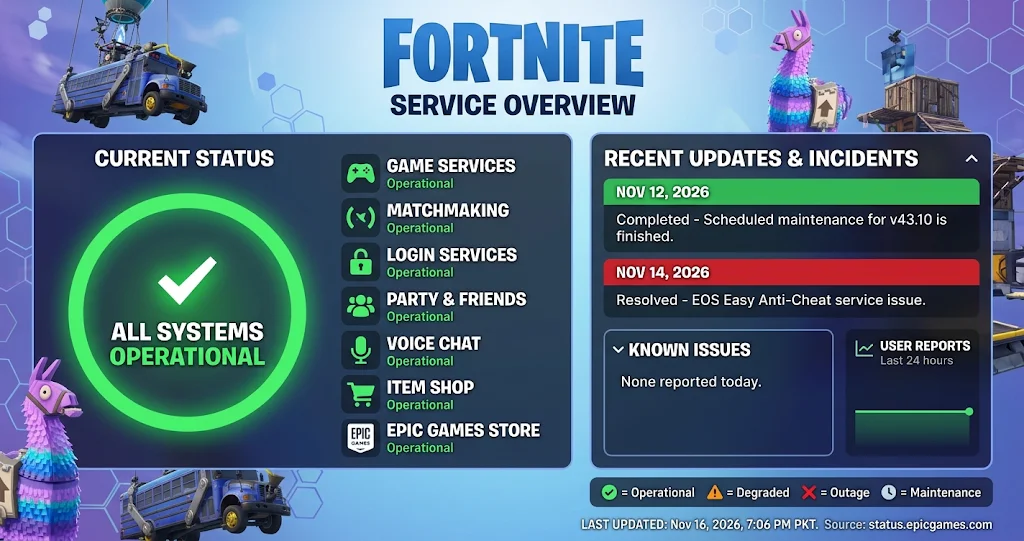
As of November 16, 2026, Epic’s public dashboard reports Fortnite services as operational, with no incidents reported for that day. However, service conditions can change, so check the live dashboard again before relying on this snapshot.
Understanding the Fortnite Server Status Dashboard
A general operational message does not tell the entire story. Fortnite relies on several connected services, and each one supports a different part of the experience.
For example, the game might launch successfully while matchmaking experiences a temporary problem. Similarly, players may enter matches but encounter difficulties with voice chat or party invitations.
The dashboard separates these components so players can identify which service needs attention. This distinction matters because restarting a console or changing network settings will not resolve an outage affecting Epic’s own infrastructure.
What Each Service Indicator Means
Epic’s dashboard uses status labels to communicate service conditions. Operational means the service is functioning normally according to the reported status. Degraded performance indicates that a service may be working with reduced performance.
A partial outage means some parts of a service are unavailable, while a major outage indicates a more serious disruption. Maintenance identifies planned or active work that can temporarily affect availability.
These labels help you understand the severity of a problem. However, they do not guarantee that every player will experience identical results, since individual connections and locations can differ.
Which Fortnite Services Should You Monitor
The most useful status indicators depend on what you are trying to do. A player who cannot sign in should pay attention to login services, while someone who cannot enter a Battle Royale match should examine matchmaking.
The following table explains the main components shown on Epic’s public status dashboard.
| Service | What It Controls | When to Check It |
|---|---|---|
| Website | Access to Epic’s web services | Website loading problems |
| Game Services | Core Fortnite online functions | General connection problems |
| Login | Account authentication | Sign-in failures |
| Parties and Friends | Social features and party access | Invitations or friend issues |
| Voice Chat | In-game communication | Microphone or voice problems |
| Matchmaking | Finding and joining matches | Queue or match entry errors |
| Stats and Leaderboards | Player statistics and rankings | Missing or delayed statistics |
| Item Shop | Store availability | Shop loading problems |
The important takeaway is that a problem with one component does not automatically mean the entire game is unavailable. Check the specific service connected to the feature you cannot use before assuming Fortnite is completely offline.
How to Read Fortnite Maintenance Announcements
Scheduled maintenance is different from an unexpected outage. Epic usually publishes a maintenance announcement when an update requires temporary downtime or changes to online services.
These notices often include a planned start time, an explanation of the update, and information about when maintenance begins. They may also explain when matchmaking becomes unavailable.
For example, Epic announced downtime for Fortnite’s v43.10 update on November 12, 2026. The announcement scheduled maintenance to begin at 9:00 UTC, with matchmaking disabled 30 minutes beforehand. Epic later marked the maintenance as completed.
This example shows why reading the full announcement matters. Matchmaking can become unavailable before the main maintenance window begins, so players should not assume that the game will remain accessible until the listed start time.
Why Matchmaking May Stop Before Maintenance
Matchmaking connects players to available game sessions. Epic may disable this feature before maintenance starts to prevent new matches from beginning shortly before services go offline.
As a result, you might still open Fortnite or reach certain menus while being unable to enter a match. This does not necessarily indicate an unexpected technical failure.
If Epic has announced maintenance, follow the published schedule and wait for the completion notice. Repeatedly restarting the game will not make an intentionally disabled service available.
How to Follow an Incident from Start to Resolution
The incident history on Epic’s status page provides more context than the current status label alone. When Epic identifies a service problem, the incident entry can show whether the team is investigating, applying a fix, or reporting a resolution.
An investigating update means Epic is looking into the reported problem. A monitoring update generally indicates that a change has been applied and the team is watching the service. A resolved notice means Epic considers the reported incident fixed.
You should also pay attention to the timestamps attached to updates. They help distinguish an active problem from an older incident that has already ended.
For instance, Epic reported an Easy Anti-Cheat service issue on November 14, 2026, and later marked it as resolved. This historical entry is useful context, but it should not be mistaken for proof of a current Fortnite outage.
Why the Fortnite Server Status May Not Match Your Experience
Sometimes the official dashboard shows normal operations even though Fortnite refuses to connect on your device. This can happen because a service-wide status report and an individual player’s connection describe different things.
Your internet connection, router, platform network, game installation, or local device settings may affect access independently of Epic’s services. Therefore, a normal dashboard is a reason to investigate other possibilities, not proof that your experience should be problem-free.
Regional network conditions can also influence connection quality. A player might experience high latency or connection interruptions even when the main game services remain operational.
If the dashboard shows no relevant incident, check whether your gaming platform has a separate network service problem. You can also restart Fortnite, review your internet connection, and check for available game updates.
However, avoid changing several network settings at once. Make one reasonable check at a time so you can identify whether anything actually improves the connection.
Official Sources Worth Following
Epic’s public status dashboard should remain your primary reference for service availability and incident history. It provides component-level information, which makes it more useful than relying on a general social media post or an isolated player report.
The official Fortnite Status account on X is another useful source for announcements. Epic’s Fortnite support center also maintains information about known issues and troubleshooting guidance.
For additional help, consult Epic’s official support article about Fortnite live issues and bugs. It explains where to find service updates and which official channels cover different parts of the game.
Conclusion
Checking the Fortnite server status is more useful when you understand the individual service indicators, maintenance announcements, and incident history. Epic’s dashboard can help you distinguish a login problem from matchmaking trouble or a wider service disruption.
Before changing your settings or reinstalling the game, check the official status page and review the latest incident updates. Follow Epic’s announcements, give scheduled maintenance time to finish, and return to your next match when the affected services are operational.
FAQs
Where can I check Fortnite server status?
You can check Fortnite’s live service availability on the official Epic Games Public Status page. It displays individual components such as login, matchmaking, game services, and voice chat. Epic also recommends following the official Fortnite Status account on X for announcements about known issues.
What does operational mean on the Fortnite status page?
Operational means Epic currently reports that the listed service is functioning normally. However, this does not guarantee that every player has a perfect connection. Local internet problems, platform services, or device issues can still prevent someone from accessing Fortnite.
Matchmaking can become unavailable because of scheduled maintenance, a temporary service issue, or a problem affecting your connection. Check the matchmaking component on Epic’s dashboard first. If it reports normal operations, review your connection and restart the game before investigating further.
Does Fortnite maintenance always take the game offline?
Maintenance can affect different services in different ways. Epic may disable matchmaking before scheduled downtime begins, while other parts of the game may remain accessible temporarily. Always read the maintenance announcement because it explains the expected timing and affected services.
How often should I check Fortnite server status?
Check the official dashboard whenever you experience login failures, matchmaking errors, or unexpected disconnections. You do not need to refresh it constantly. Reviewing the incident history and checking again after an official update is usually enough to understand whether a reported problem has been resolved.
For more updates visit: PUBLIC TALK